
A year ago, I shared my initial foray into incorporating AI in education, moving from skepticism to a sense of pioneering spirit (you can read about it here: https://honorlearners.com/2024/02/18/from-skeptic-to-pioneer-my-journey-into-incorporating-ai-in-education/). Today, I’m thrilled to share how I brought the power of AI to my 2nd-grade learners through an engaging app smash using Magic School AI, Seesaw, and Book Creator. This experience not only boosted their writing skills but also ignited their curiosity and creativity.
The Power of Each App: A Quick Recap
Seesaw: Our digital hub, fostering student portfolios, reflection, and family communication.
Magic School AI: The educator’s ally, providing AI-powered tools for lesson planning, resource generation, and personalized feedback.
Book Creator: The creative canvas, empowering students to design and publish their own digital books.
Our App Smash Journey: Step by Step
Igniting Curiosity with Magic School AI:
We began by tapping into Magic School AI’s Informational Text tool. Our learners chose a variety of topics that sparked their interest, and Magic School AI generated informational texts that served as a springboard for their learning. This step not only provided valuable content but also demonstrated how AI can be a powerful research tool.
Research, Note-Taking, and Drafting:
After absorbing the AI-generated texts, the learners delved deeper, conducting further research and taking detailed notes. They then crafted their own informational texts, demonstrating their understanding of the topics.
Seesaw: The Digital Drafting Space:
Learners typed their drafts into Seesaw, saving them as works in progress. Seesaw’s versatility allowed them to easily revise and refine their writing. It also documented the writing process, allowing families to see the steps we took to edit and revise our writing.
Magic Student: AI-Powered Revision and Feedback:
This is where the magic truly happened. I launched a Magic Student room with three key tools: Text Proofreader, Writing Feedback, and the Raina Chatbot. To ensure feedback was aligned with our learning objectives, I uploaded a copy of our writing rubric. I shared the link to the Magic Student room in Seesaw, and learners used their tech code names (color, animal, number) to protect their identity. What’s particularly powerful about the Magic Student room is the transparency it offers teachers. Teachers can see how learners are interacting with each of the tools, identifying areas where they excel and where they needed additional support. As it was the first time, our learners were using Magic Student, and navigating multiple tabs, the following steps were done with my support. After all, they are only 7!
Text Proofreader:
Learners copied their text from Seesaw into the Text Proofreader, receiving instant feedback on grammar and spelling. We duplicated the page in Seesaw and pasted the feedback, allowing students to make direct edits. As they edited, I provided targeted instruction on spelling patterns and grammatical rules.
Writing Feedback:
Learners then copied their edited text into the Writing Feedback tool, which provided constructive feedback on the strengths and areas for growth in their writing. This feedback was copied into Seesaw, and used as a guide for revision.
Raina Chatbot:
We used a combination of the Writing Feedback tool and the Raina Chatbot to revise sections of their text, focusing on enhancing vocabulary and adding descriptive details. Some learners even expanded their texts by adding new paragraphs based on the feedback they received.
A side note: If you want more information about writing tools that can be used to support learners in Magic School Student, check out this recent Webinar hosted by both Magic School AI and Book Creator. It was inspiring enough for me to take the free Book Creator Certified Author course.


Book Creator: Publishing Our Informational Books:
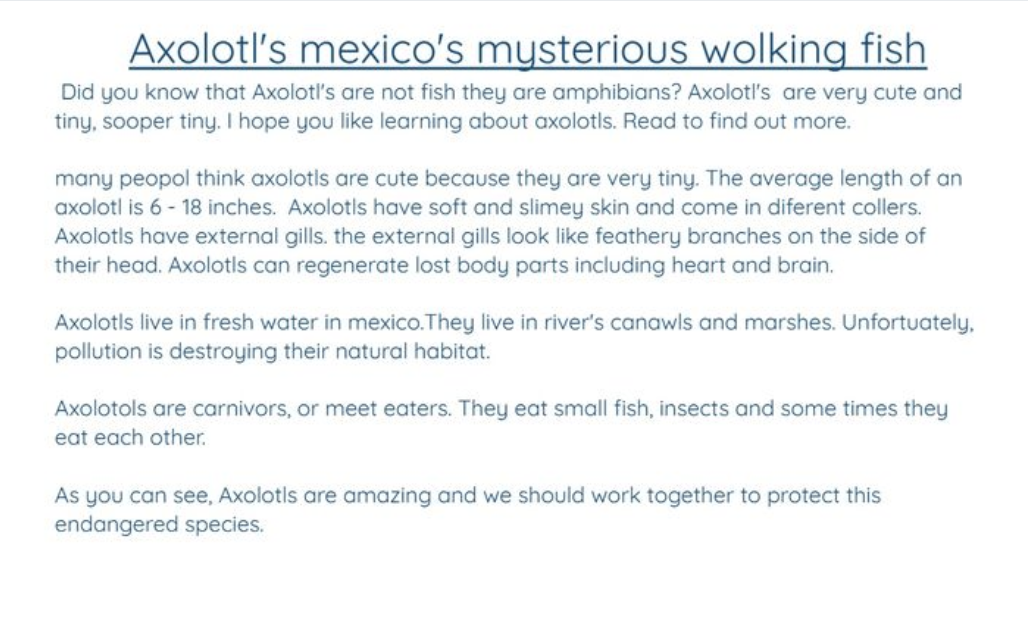
With their revised texts in hand, learners copied their work into Book Creator. They then transformed their writing into beautifully designed digital books, adding images and multimedia elements. Some learners went above and beyond, incorporating tables of contents and glossaries.

Seesaw: Sharing Our Published Works:
As published authors, learners proudly shared their digital books with their families via Seesaw. We downloaded them as PDFs, uploaded them to Seesaw and added the published book link to the first page. We also shared our books by reading them to a younger class, which was a very rewarding experience.
This app smash journey had a profound impact on my 2nd-grade learners. They experienced firsthand the power of AI as a valuable tool for both learning and creativity. The learners developed a deeper understanding of the writing process, moving beyond simple drafting to engage in meaningful revision and refinement. They gained confidence in their ability to use technology to enhance their learning, becoming more comfortable and proficient with digital tools. Furthermore, they learned valuable lessons about digital citizenship, understanding the importance of protecting their identity online while engaging with AI platforms.
This experience reinforced several key takeaways regarding the integration of AI in elementary education. Firstly, AI can be a valuable and accessible tool for even young learners, fostering creativity and critical thinking. Secondly, app smashing, when thoughtfully planned, creates engaging and meaningful learning experiences that resonate with learners. Finally, providing clear guidance, support, and a structured framework is essential for the successful integration of AI, ensuring that students can maximize its benefits while navigating potential challenges.
I sincerely encourage you to explore the vast possibilities of AI within your own classroom. Take the leap and experiment with app smashing, discovering firsthand how it can transform your teaching practices and enrich your students’ learning experiences. Share your own AI integration stories in the comments below, fostering a community of educators who are passionate about leveraging technology to empower the next generation of learners. Let’s continue to learn from each other and push the boundaries of educational innovation.


 Honor Learners