Creating Community Through Class Names and Promises

From Endings to Beginnings

At the end of last school year, I wrote about some of the traditions I use to close our year together. Afterwards, several people asked me to share some ideas for the beginning of the year. So here it is—a practice that has become a cornerstone of how I build community with my learners: creating a class name and a class promise. Like all good educators, I learn from others. These traditions are something I learned from my friend and former colleague, Ria, who inspired me to make class names and class promise a part of our classroom culture.

The Hummingbird Story

I like to start with a story that has shaped me since childhood. Wangari Maathai, founder of the Greenbelt Movement in Kenya, Nobel Peace Prize laureate, and my neighbor when I was growing up, often told the parable of the hummingbird.

In the story, a forest is on fire. The big animals stand by, helpless and afraid, while the tiny hummingbird flies back and forth, dropping water on the flames one beakful at a time. The hummingbird says, “I am doing the best I can.”

This story inspires us to think about the qualities we want to embody as a class—small but mighty, resilient, and purposeful. Together, we begin to collect adjectives that describe how we want to be.

Choosing Our Class Name

From there, we make a list of animals. Through discussion, debate, and voting, we narrow our choices down until we land on a combination of one adjective and one animal.

Past classes have been The Helpful Hummingbirds and The Joyful Trying Turtles. This year, after much excitement and thoughtful talk, we proudly became The Kind Foxes.

A class name may sound simple, but it gives learners a powerful sense of identity. It’s something that brings us together as a learning community.

Making Our Class Promise

Alongside our name, we also create a class promise. It’s not a list of rules—it’s our shared commitment to how we want to live and learn together. This year’s promise is:
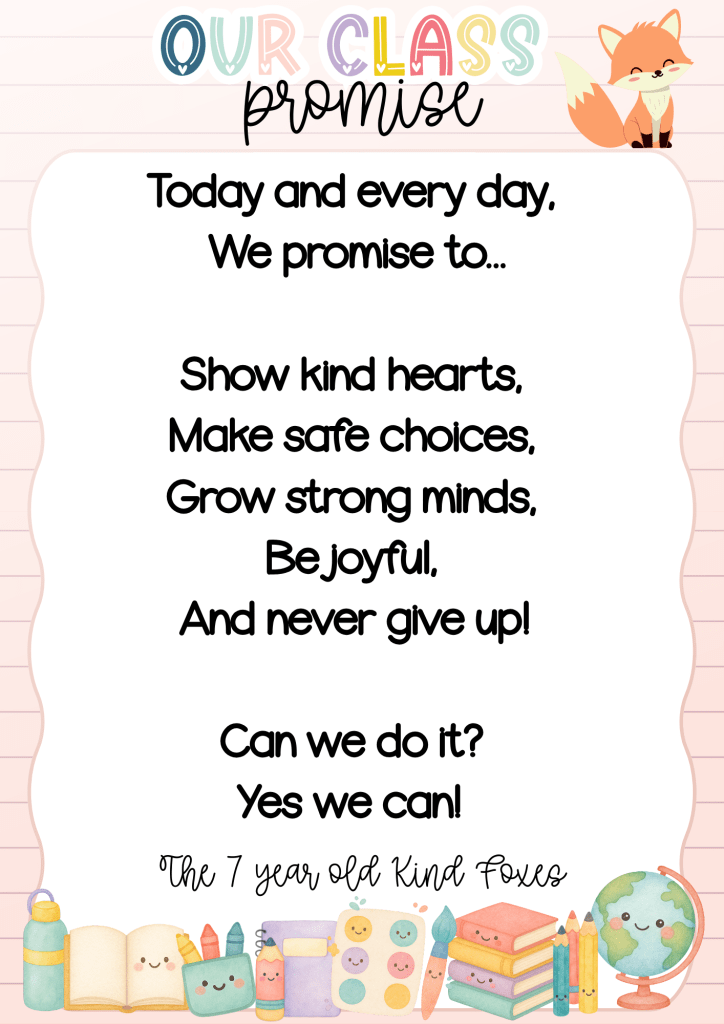
Reciting our promise as a morning chant has become a meaningful ritual. It’s something I first learned during my grade 1 teaching days with Ria, and I’ve carried it with me ever since. Saying it together each day helps anchor our sense of community and it’s a daily reminder for our learners that they helped build the foundation of our classroom community.

Linking to the 4Cs

What I love about this process is how naturally it connects to the 4Cs: Creativity, Collaboration, Communication, and Critical Thinking.

  • Creativity – Learners brainstorm fun, meaningful class names.
  • Collaboration – Learners work together to refine the promise until it represents everyone.
  • Communication – They discuss, debate, and practice explaining their ideas respectfully.
  • Critical Thinking – Learners reflect on which behaviors truly matter for making school safe, joyful, and successful.

The result isn’t just words on a wall. It’s a shared agreement that guides our choices and builds trust, day after day.

Why It Matters

When children feel like they belong to something bigger than themselves, they rise to the expectations they’ve helped to create. Our class name and promise become an anchor, shaping not only the way we treat each other but also the way we approach learning challenges together.

And as the year unfolds, I hear students whispering to each other: “Remember, we promised to keep trying.” That’s when I know it’s working.
Canva in the Classroom: Learning to Create, Creating to Learn

I want to begin by sincerely thanking everyone who supported me as I took the first step in sharing this blog more publicly. I’ve been incredibly moved by the kind messages and encouragement I’ve received—especially from friends and colleagues around the world. Your responses have truly humbled me and reminded me how powerful it is to share and connect through our work.

It’s moments like these that remind me of the quote in my email signature: Ubuntu – I am, because we are. This journey has never been just mine—it’s been shaped and strengthened by the community around me.

One message I received suggested I consider becoming a consultant. I had to smile at that—because it’s taken me seven years just to say out loud that I’ve been blogging! I’m not quite ready for that next step. Honestly, I find so much joy working with my students and supporting our school’s goals (and yes, sometimes gently encouraging us to stretch our goals and think bigger).

This week, a colleague stopped me in the hallway and told me how much she had learned from one of my recent ideas. She’d tried the clock matching game I shared with her own daughter—who had been struggling to tell time. It helped make the concept click for her in a fun and playful way. Moments like these are what keep me motivated.

Some colleagues have asked how I know so much about Canva. The truth is, I’ve been a Canva Pro subscriber for seven years—and I didn’t use it much at first. My real Canva learning curve came through my role as MSA Communications Lead, where I used it to create social media posts, newsletters, and content for our website.

I’ve also had access to Canva for Education for the last two years, but it’s only recently that I’ve started using it more and more in my teaching—to create worksheets, games, and other learning resources. I’ve been inspired by amazing educators who generously share their knowledge on social media—if Instagram offered PD certificates, I’d be drowning in them! One of the educators I’ve learned so much from is @teresakwant. She shares amazing Teacher Canva Hacks that have saved me time and sparked new ideas for my classroom.

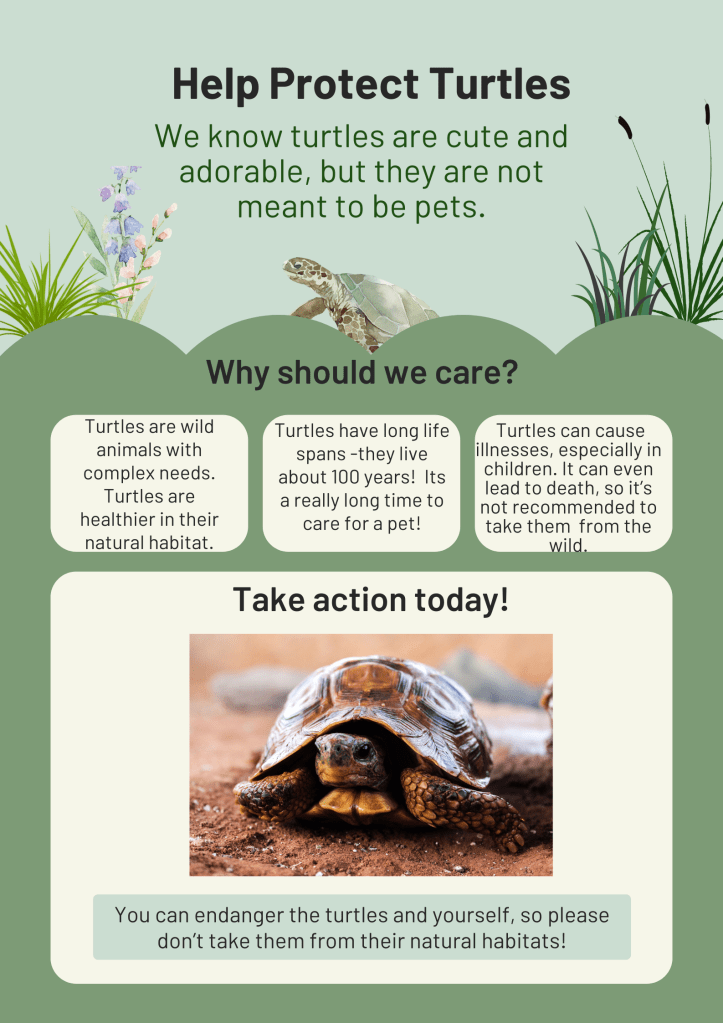
Now I’m venturing into creating interactive lessons within Canva, and it feels like I’m finally unlocking its full potential—not just as a design tool, but as a powerful learning platform. This week, I stumbled upon a lesson from Canva’s Design School on creating persuasive posters (link here), which was a perfect fit for what my students are working on as they take action in their Cultural Studies class.

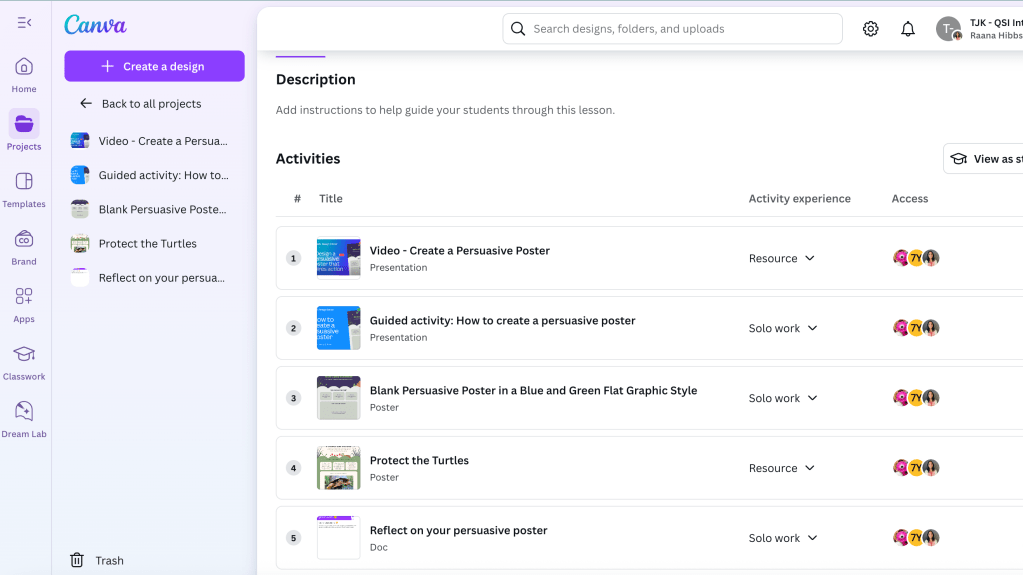
At first, I thought about sending my students directly to the Canva Design School course—but they’re only seven years old, and navigating the platform that way felt too complex. I looked for the lesson inside Canva for Education but couldn’t find it. So, I decided to recreate it myself as a lesson in our Canva Classroom.

This Canva Help article guided me through the process. I couldn’t find the video in the Canva YouTube app because this lesson launched this week, so I took a screenshot of the video, put it in a presentation and linked the video to that instead. I added “_popup” after “watch” and before the “?” in the URL to change the viewing experience to a fullscreen without distractions. Next, I added the lesson resources as solo work activities, so Canva automatically created copies for each student.

The next day, I introduced the lesson to my class and told them we’d be learning from a guest teacher—Mrs. Bel. I showed them the course in Canva Design School and explained that we’d be following the same course in our Canva Classroom. We watched the video together and practiced essential design skills—like changing font sizes, adding and resizing images, working with layers, and applying design styles. They especially loved exploring the different font styles and color combinations—it was the perfect opportunity to remind them how important it is to make design choices that match the theme and purpose of their poster.

The following day, I modelled how to change the poster template that was shared. After all, our students learn best when we model how to use technology with purpose and care. I was later able to add the poster model to the lesson as a view-only resource, so learners had access to an example as a visual support.

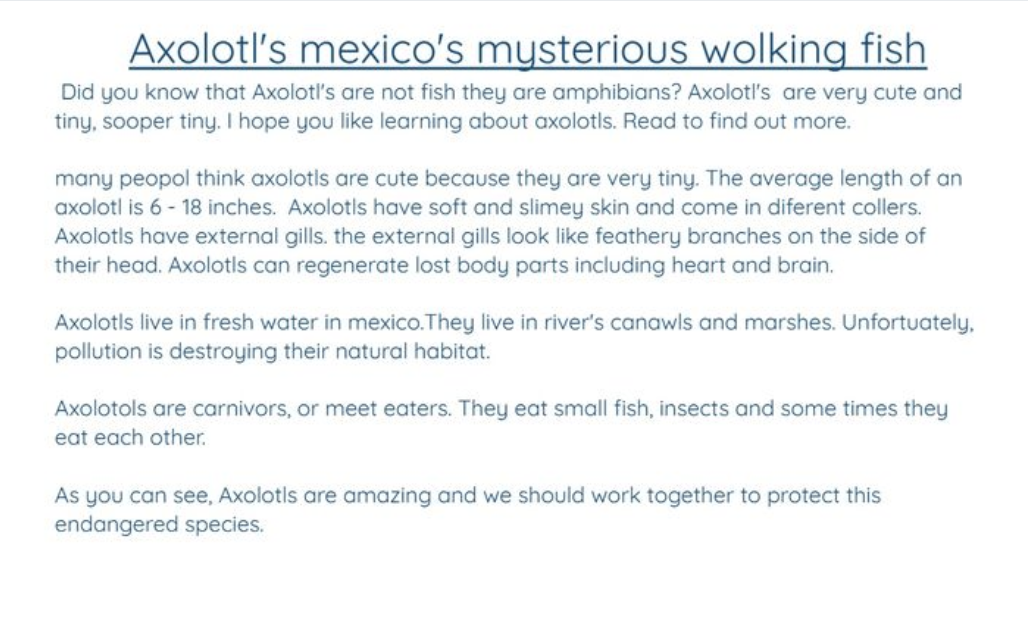
Students then began creating their own persuasive posters using the skills they had learned. What I loved most was how the structure allowed students to work at their own pace, sharing their solo work with me before moving on. I could give timely feedback and ask for edits or mark their work as complete.

This experience reminded me how important it is to set high expectations and explicitly teach the tools and techniques learners need to succeed. Instead of simply asking students to “make a poster,” we gave them the vocabulary, modeling, and guided practice to do it with purpose and confidence. For my early finishers, I awarded an “expert” badge and gave them the chance to become peer helpers—a proud moment for them and a big help to me!

There was so much great learning packed into this experience. With permission, I’m sharing one student’s poster below. I’m so proud of the creativity, effort, and confidence I saw in my students this week.

Thank you again for being part of this journey with me. I’m learning right alongside my students—and that’s the best part.

From Idea to Interactive: Bringing Learning to Life with Canva Code (and saving precious teacher time too!)

If you had told me a year ago that I’d be coding my own games for class, I probably would have laughed. My experience with coding has been fairly limited: introducing my young students to Scratch Jr., and during lockdown, diving into creating Pixel Art Reveals using Google Sheets – a skill I picked up through many helpful YouTube tutorials and online workshops offered by generous educators. Since then, I’ve admired the potential of educational tech, engaging with it in various ways, but coding felt like a different realm – until recently, when Canva Code offered an opportunity to step back in.

With no real coding experience, I started small: a matching game to review telling time, connecting analogue clocks with digital time. I designed it with three levels of increasing difficulty, and to make it even more engaging, I added a Pac-Man style reward game after each level. In true coding spirit, the game took several iterations to get right—and I quickly learned the value of thorough testing before sharing with students. But the result? It felt like pure magic. My students were genuinely engaged, and their excitement inspired me to keep going.

Next, I created a 2D shape matching game, where students matched shape names with their attribute descriptions. I was inspired by Classnotes with Nicole (I recommend checking out her blog because she shares a free guide to creating Canva Code games and her EASY prompt is really helpful). It was a simpler build—time was tight—but it worked beautifully as a review tool, especially for my multilingual learners who benefit so much from that extra vocabulary support. Seeing them light up as they successfully matched the visuals with the words just hammered home what I already knew: games aren’t just a bit of fun; they’re seriously powerful learning tools in disguise.

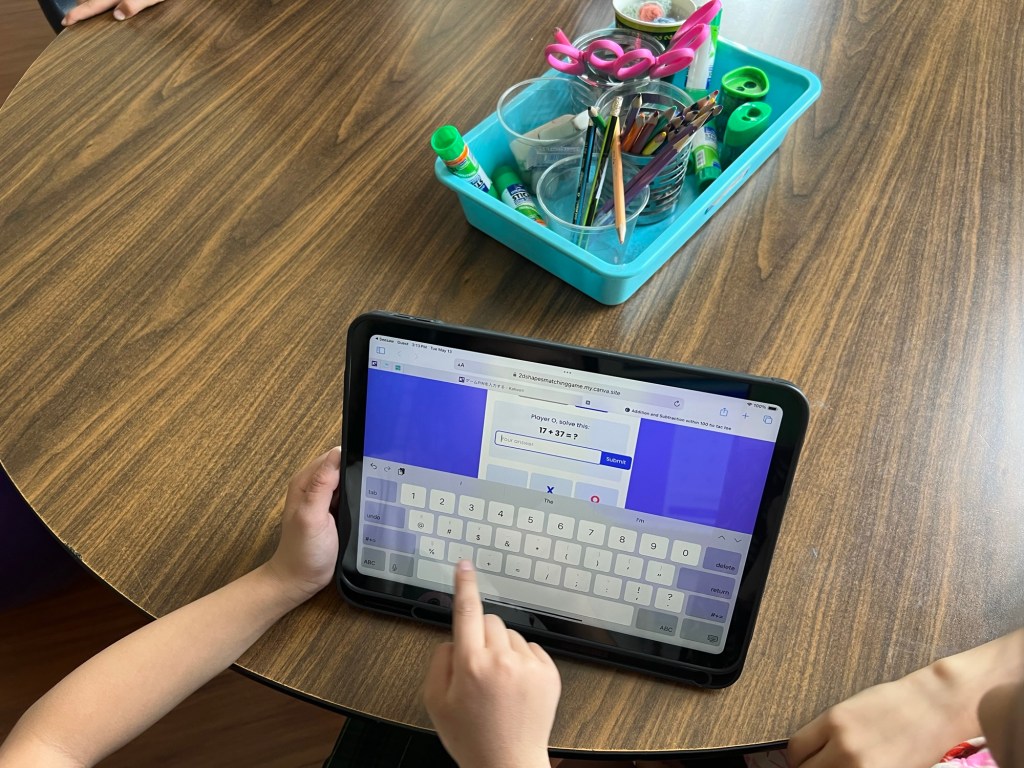
With two games under my belt, I wanted to try something new. As we approach the end of the year, building confidence in mental math is a key focus. So I asked Canva Code to help me create a 2-player tic-tac-toe game—with a twist. Before each move, students must solve a 2-digit addition or subtraction problem (within 100). Get it right, take your turn. Get it wrong, skip your turn. First to three in a row wins.

Now, the first attempt wasn’t exactly flawless – sneaky players could still try to click on a spot that was already taken. So, back to Canva Code I went, and like magic, it was fixed! Then, because every winner deserves a celebration, I added a burst of confetti for the champion and a clear, friendly landing page with all the instructions. The whole thing came together in under 20 minutes. Seriously! It’s quick, totally tailored to what my students need, and reusable – a far cry from those elaborate escape rooms I used to spend hours crafting that got played exactly once.

img_8773

The amazing Canva Code – along with a whole bunch of other super cool new features – will be released very soon! In fact, I even saw a post today hinting that some users (beyond the original first million) might already have access! It’s genuinely thrilling to think about how many more educators will soon have these incredible tools at their fingertips, making it so easy to design, tweak, and bring their awesome classroom ideas to life.

In the meantime, if you’re curious to see what I’ve created so far, feel free to dive in:

🎯 Memory Game for Teaching Time
🔷 2D Shapes Matching Game
➕➖ Addition & Subtraction Tic-Tac-Toe

This shift has been more than just practical—it’s been empowering. Canva Code has allowed me to build games tailored to my learners’ needs, in real time. And the best part? Their reactions. One student said it best:

“I wonder what she’ll ask Canva to code next?”

Learning is fun. And when I’m learning alongside my students, it becomes something even more powerful: joyful, shared discovery.

Unlocking Deeper Learning: The Power of App Smashing and AI in an elementary classroom

Technology is constantly evolving, and AI is undoubtedly here to stay. As educators, it’s our responsibility to remain perpetual learners, not just to keep pace but to empower our students to make informed choices and utilize technology effectively. I firmly believe that by modeling this behavior of continuous learning and a willingness to adapt, the learners I encounter will be inspired to cultivate the same crucial skills.

In my previous post, I shared our initial explorations into the world of AI and app smashing, detailing how we creatively combined Magic Student, Seesaw, and Book Creator. Today, I’m excited to delve into our next adventure: how we harnessed the power of Canva and Magic Student to plan and teach a poetry unit that culminated in a truly engaging Poetry Video Podcast.

Planning and Presentation with Canva AI:

Inspired by the free “Canva AI in the Classroom” course, I used the AI features within Canva to create two key poetry lessons: one focusing on the visual form of Shape Poetry and another exploring the concise structure of Haikus. For our Shape Poetry lesson, we the fascinating world of spirals after reading a captivating nonfiction book highlighting their presence in the environment.

To take it one step further, I asked Canva to help create presentations based on these lesson plans. This saved valuable preparation time and provided visually engaging materials tailored to the concepts we were exploring.

Empowering Student Choice with Magic Student’s Poetry Room:

These are the Magic Student Tools that were included in our Poetry Room. If you are a Magic School AI user, I have shared a template to the room below.

As my second graders prepared to embark on their own poetic journeys, I introduced them to a dedicated “Poetry Room” within Magic Student. This digital space offered them agency and support in their creative process. Some students eagerly utilized the Idea Generator to spark initial concepts for their poems, while others astutely used it for feedback on their developing ideas. This demonstrated a wonderful early development of their metacognitive skills as writers, making informed choices about the support they needed.

Collaborative Creation in Canva Classroom:

This is the template we created together using an exemplar haiku I wrote. We learned how to add a background, use text effects and layer elements, including text.

The next stage involved bringing their poetic words to life visually using Canva. We began by collaboratively creating a template within Canva. This was a fantastic opportunity to explicitly teach them how to utilize text effects and layer elements, fostering an understanding of design principles for a more polished final product. Once our shared template was established, I duplicated it for each student and assigned it through Canva Classroom. This allowed us to work simultaneously within the same slide deck, fostering a sense of community and shared creation. It was inspiring to witness the diverse ways students chose to enhance their poems visually. Some experimented with AI image generators within Canva, while others carefully selected graphics or photographs that resonated with their poetic themes.

Unexpected Inspiration: From Slides to Sound:

Our initial plan was to conclude the project with their visually rich poetry slides. However, during our Spring break, I dedicated an hour to exploring the “What’s new in Canva – March edition” webinar. This proved to be an unexpectedly transformative moment! I was particularly excited by the demonstration of Canva’s enhanced video and audio features, sparking an idea to take our poetry project a step further – into the realm of video podcasts.

Creating Poetry Video Podcasts:

Upon our return from the break, I found moments when learners were focused on independent learning to record each learner for our podcast. Using my MacBook’s microphone and Canva’s remarkable new “enhance audio” feature, we captured their voices reading their poetry and sharing their knowledge of poetry. The result was truly impressive – despite the recording taking place within a busy classroom environment, the enhanced audio clarity made it sound as if we were in a professional recording studio!

The journey of our poetry unit, from initial brainstorming with Magic Student to the creation of engaging video podcasts in Canva, has been a testament to the power of integrating AI and innovative digital tools. It’s been inspiring to witness my second graders not only deepen their understanding of poetry but also develop their digital literacy and creative expression in such dynamic ways.

And thanks to Canva’s Visual Suite 2.0, launched just last week, I can easily share all the diverse materials created throughout this unit – planning notes, Canva presentations, and an excerpt from the final video podcast – all within one easily accessible slide deck.

Now, I’d love to hear from you! How are you exploring the possibilities of AI and app smashing in your elementary classroom? What creative projects are you and your students embarking on? Share your experiences and ideas in the comments below – let’s continue to learn and grow together in this exciting era of educational technology!

Empowering Young Writers: AI and App Smashing in the Elementary Classroom

A year ago, I shared my initial foray into incorporating AI in education, moving from skepticism to a sense of pioneering spirit (you can read about it here: https://honorlearners.com/2024/02/18/from-skeptic-to-pioneer-my-journey-into-incorporating-ai-in-education/). Today, I’m thrilled to share how I brought the power of AI to my 2nd-grade learners through an engaging app smash using Magic School AI, Seesaw, and Book Creator. This experience not only boosted their writing skills but also ignited their curiosity and creativity.

The Power of Each App: A Quick Recap

Seesaw: Our digital hub, fostering student portfolios, reflection, and family communication.

Magic School AI: The educator’s ally, providing AI-powered tools for lesson planning, resource generation, and personalized feedback.

Book Creator: The creative canvas, empowering students to design and publish their own digital books.

Our App Smash Journey: Step by Step

Igniting Curiosity with Magic School AI:

We began by tapping into Magic School AI’s Informational Text tool. Our learners chose a variety of topics that sparked their interest, and Magic School AI generated informational texts that served as a springboard for their learning. This step not only provided valuable content but also demonstrated how AI can be a powerful research tool.

Research, Note-Taking, and Drafting:

After absorbing the AI-generated texts, the learners delved deeper, conducting further research and taking detailed notes. They then crafted their own informational texts, demonstrating their understanding of the topics.

Seesaw: The Digital Drafting Space:

Learners typed their drafts into Seesaw, saving them as works in progress. Seesaw’s versatility allowed them to easily revise and refine their writing. It also documented the writing process, allowing families to see the steps we took to edit and revise our writing.

Magic Student: AI-Powered Revision and Feedback:

This is where the magic truly happened. I launched a Magic Student room with three key tools: Text Proofreader, Writing Feedback, and the Raina Chatbot. To ensure feedback was aligned with our learning objectives, I uploaded a copy of our writing rubric. I shared the link to the Magic Student room in Seesaw, and learners used their tech code names (color, animal, number) to protect their identity. What’s particularly powerful about the Magic Student room is the transparency it offers teachers. Teachers can see how learners are interacting with each of the tools, identifying areas where they excel and where they needed additional support. As it was the first time, our learners were using Magic Student, and navigating multiple tabs, the following steps were done with my support. After all, they are only 7!

Text Proofreader:

Learners copied their text from Seesaw into the Text Proofreader, receiving instant feedback on grammar and spelling. We duplicated the page in Seesaw and pasted the feedback, allowing students to make direct edits. As they edited, I provided targeted instruction on spelling patterns and grammatical rules.

Writing Feedback:

Learners then copied their edited text into the Writing Feedback tool, which provided constructive feedback on the strengths and areas for growth in their writing. This feedback was copied into Seesaw, and used as a guide for revision.

Raina Chatbot:

We used a combination of the Writing Feedback tool and the Raina Chatbot to revise sections of their text, focusing on enhancing vocabulary and adding descriptive details. Some learners even expanded their texts by adding new paragraphs based on the feedback they received.

A side note: If you want more information about writing tools that can be used to support learners in Magic School Student, check out this recent Webinar hosted by both Magic School AI and Book Creator. It was inspiring enough for me to take the free Book Creator Certified Author course.

Book Creator: Publishing Our Informational Books:

With their revised texts in hand, learners copied their work into Book Creator. They then transformed their writing into beautifully designed digital books, adding images and multimedia elements. Some learners went above and beyond, incorporating tables of contents and glossaries.

Seesaw: Sharing Our Published Works:

As published authors, learners proudly shared their digital books with their families via Seesaw. We downloaded them as PDFs, uploaded them to Seesaw and added the published book link to the first page. We also shared our books by reading them to a younger class, which was a very rewarding experience.

This app smash journey had a profound impact on my 2nd-grade learners. They experienced firsthand the power of AI as a valuable tool for both learning and creativity. The learners developed a deeper understanding of the writing process, moving beyond simple drafting to engage in meaningful revision and refinement. They gained confidence in their ability to use technology to enhance their learning, becoming more comfortable and proficient with digital tools. Furthermore, they learned valuable lessons about digital citizenship, understanding the importance of protecting their identity online while engaging with AI platforms.

This experience reinforced several key takeaways regarding the integration of AI in elementary education. Firstly, AI can be a valuable and accessible tool for even young learners, fostering creativity and critical thinking. Secondly, app smashing, when thoughtfully planned, creates engaging and meaningful learning experiences that resonate with learners. Finally, providing clear guidance, support, and a structured framework is essential for the successful integration of AI, ensuring that students can maximize its benefits while navigating potential challenges.

I sincerely encourage you to explore the vast possibilities of AI within your own classroom. Take the leap and experiment with app smashing, discovering firsthand how it can transform your teaching practices and enrich your students’ learning experiences. Share your own AI integration stories in the comments below, fostering a community of educators who are passionate about leveraging technology to empower the next generation of learners. Let’s continue to learn from each other and push the boundaries of educational innovation.

From Fads to Focus: My Journey with Sensory Integration in the Classroom

Early in my teaching career, Brain Gym was all the rage. Those 2-3 minute activities, designed to get learners moving and crossing the midline, were supposed to boost focus. While it felt like just another educational fad, something resonated with me. I saw the value in getting kids moving. Years later, as a Kindergarten teacher, I began to understand why. I learned about the importance of core strength for writing and sitting, and I discovered the power of multisensory learning. We incorporated movement breaks (Go Noodle is a fantastic resource), and I thought I was doing enough. I was wrong.

My real education began when I met a young learner I’ll call “Sunshine Bug.” She had a remarkable ability to notice and appreciate the natural world around her, and her smile was infectious. In kindergarten, she was the child who hugged my legs during story time and joyfully embraced every messy activity. I had the pleasure of teaching her again in second grade. This time, she cartwheeled and twirled through the classroom instead of simply walking, and she spent recess lying on her stomach on the swings. One day, she shared something that profoundly shifted my perspective: the world, she explained, was always in motion, and unless she moved with it, things didn’t make sense. It was as if everything was spinning unless her feet were in the air or she was receiving a hug. That moment was a turning point. Working closely with her parents, we implemented several strategies: frequent swing breaks, a weighted blanket, wiggle seats, and a self-massage routine. Just as these supports were taking effect, the COVID-19 pandemic hit, and we were all thrust into the challenges of online learning.

Since then, I’ve been integrating everything I learned from my previous students. And it worked, mostly. Until this year. This year’s second grade class class has been one of the most challenging I’ve ever worked with, but it’s also been an incredible opportunity for growth. Many learners needed intense support to focus and be ready to learn. They struggled to stay in their seats, keep their hands to themselves, and their pencils were either being chewed or used to build miniature towers while they tried to listen. It has taken all the classroom management tools I’ve added to my toolbox over the years to establish routines, but some learners needed more. That’s when our learning support teacher visited. She recommended a sensory diet intervention for some of our learners. We talked through our ideas and decided to add yoga balls as alternative seating and create a choice board with 12 sensory integration activities. Learners would choose three activities to complete each day, in addition to the whole-class movement breaks we already did.

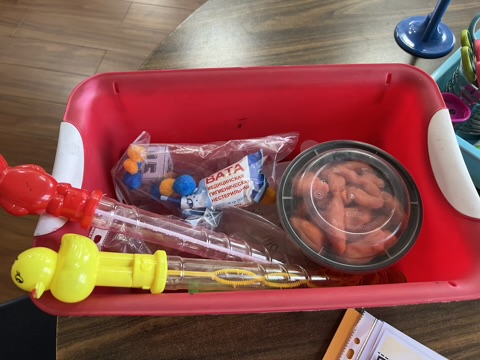
I researched sensory diet choice boards and eventually created my own using Canva. The activities range from playing with play dough and rolling on a yoga ball to blowing bubbles and doing yoga. I also incorporated resources like Coach Corey Martin’s Jump Battles and a fantastic 7-minute HIIT workout from He’s Extraordinary ( a great site with so much information and loads of free resources). This combination of activities helps address a variety of sensory needs.

I cut out and laminated the choice cards. I added little velcro dots so they can be stuck onto the choice board. I usually change the choices available once a week. Students can then choose three activities during their session. As an activity is completed, they can move the card to the completed section. I’ve gathered all the materials in one place and I’ve added a little sand timer to the box to put a time limit on some activities.

It’s still early days, but I’m already seeing positive changes. Learners seem more focused, and there are fewer disruptions. It’s also interesting to observe the choices of activities learners choose as they learn to listen to their body and what it needs. Naturally, we have not been able to implement this for everyone in the class, but other learners have benefited from the flexible yoga ball seating and it has given me some insight into their sensory needs too.

It’s been a journey, from my initial understanding of movement in learning with Brain Gym to recognizing the complex sensory needs of my students. This experience has reinforced the importance of continuous learning, adapting to individual needs, and seeking support from colleagues.

Now, I’m sharing my sensory diet choice board with you! I hope it’s a helpful resource in your classroom or home.

What are your favorite sensory activities for kids? Share your ideas in the comments below! I’d love to hear from you. And if you found this post helpful, please share it with other educators and parents!

Keeping Learners Active and Engaged Indoors: Fun and Educational Games for the Classroom

As educators, we all know the importance of keeping our learners active and engaged in the classroom. This is especially true during the winter months when outdoor recess may not be an option, or when air quality is poor as it has been recently here in Dushanbe. But just because we’re stuck inside doesn’t mean we can’t have fun and learn at the same time!

In this blog post, I’ll share some of my favorite games that I’ve been using to keep my learners moving and learning, even when we can’t go outside. These games are all adaptable to different grade levels and subjects, so you’re sure to find something that will work for your class.

1. Which One Doesn’t Belong?

This is a great game for getting learners to think critically and discuss different concepts. To play, simply display a group of four pictures, words, math equations, etc., and label them A, B, C, and D. Ask learners to turn and learn with their partners to discuss which one doesn’t belong. Remind them that there is no right or wrong answer. This pre-discussion is especially helpful for multi-language learners.

Once learners have had a chance to discuss, ask them to vote with their feet by moving to a matching corner in the classroom. Then, bring the class back together and share ideas. To extend their thinking, ask learners to come up with reasons for an answer they did not choose.

2. Musical Chairs

This classic game is a fun way to get learners up and moving while practicing any subject. I found a great resource for musical chairs on Instagram from @headoverheelsforteaching. They also have a product available on Teachers Pay Teachers that includes everything you need to play musical chairs in any subject: Musical Chairs Learning Activity – For Any Subject

3. Ultimate Tic Tac Toe with Collaborative Problem Solving

This is a fantastic game for math class or any subject that involves strategic thinking and teamwork. Played on a large 3×3 grid containing nine smaller tic-tac-toe boards, teams aim to win individual small games and the larger 3×3 grid. The twist? Before placing their mark, every member of a team must collaborate to solve a math problem (or a problem related to the current subject). Once the team agrees on the solution, one member explains their reasoning to the teacher. A correct explanation earns them the right to place their X or O on the chosen small board. This variation fosters collaboration, communication, and reinforces problem-solving skills, giving learners multiple opportunities to demonstrate their understanding and learn from each other.

4. Capture the Flag

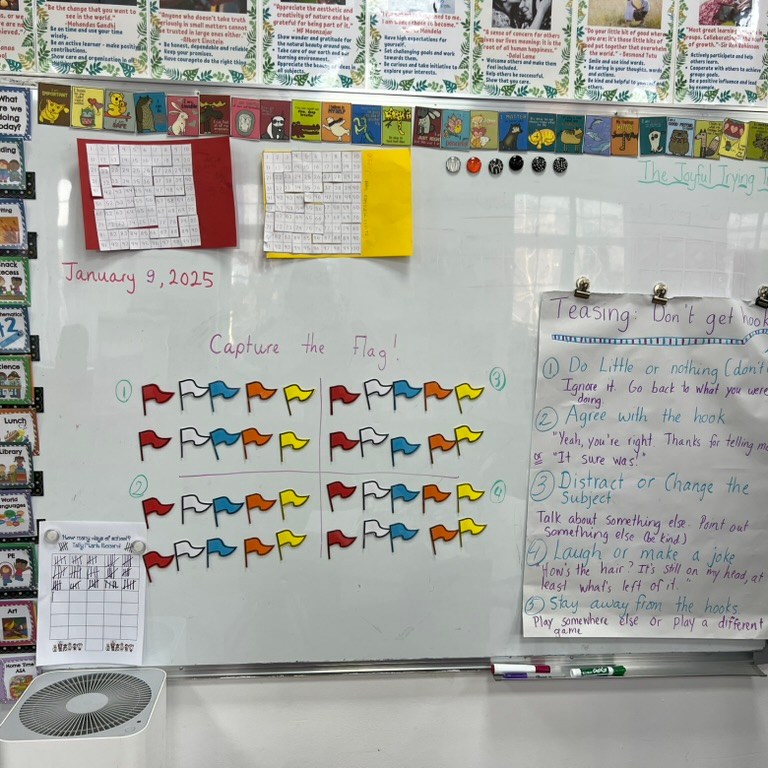
This is a fun and active game that can be adapted to any subject. To play, print out flags on different colored paper, laminate them, and attach magnetic tape so they can be easily stuck to a whiteboard or projector screen. Divide the class into teams and give each team two flags of each color. Assign a point value to each color flag, but don’t share the point system with the learners. After each question, a group can steal a flag from another team if they answer the question correctly. At the end of the lesson, reveal the point value of each flag and calculate which team has the most points. This game gets learners up and moving around the classroom throughout the lesson.

5. Indoor Snowball Fight

Who says you can’t have a snowball fight indoors? This is a fun and engaging way to practice any subject matter. To play, print out snowballs with different questions related to your topic. You can also include some “yellow snow” cards that require learners to do a short exercise routine. Crumple up the snowballs and toss them around the classroom. Learners pick up a snowball, answer the question on a recording sheet, and then complete any exercises if they get a yellow snow card. This game is sure to get your learners moving and learning! Here is a link to a snowball fight resource I created on Canva that can be adapted to any topic: Indoor Snowball Fight

6. Boom, Clap, Snatch (with a Twist!)

This is a quick, easy, and engaging game that can be used to review virtually any material, from true/false statements to phonics sounds. It adds a physical element that gets learners listening attentively and reacting quickly. Here’s how to play:

  • Preparation: Partners sit facing each other. Place a “tented” card (folded in half to stand like a small tent) between them. The card can display a true/false statement, two different phonemes being learned, two vocabulary words, or any other paired items you want learners to distinguish.
  • The Rhythm: Establish a rhythm using body percussion. For example:
    • “BOOM”: Learners pat their laps.
    • “CLAP”: Learners clap their hands.
    • You can create various rhythmic patterns, such as “BOOM, CLAP, CLAP,” “BOOM, BOOM, CLAP,” or even more complex sequences. This adds an element of focus and coordination.
  • The Cue: After establishing the rhythm, you’ll say a cue related to one of the items on the card. For example:
    • If the card has “True” and “False,” you might say, “The capital of France is Paris.”
    • If the card has the phonemes /sh/ and /ch/, you might say the word “ship.”
    • If the card has two vocabulary words, you could give a definition for one of the words.
  • The Snatch: As soon as learners hear the cue, they race to “snatch” (grab) the correct card in front of them. The first learner to grab the correct card wins that round.

This variation of Boom, Clap, Snatch adds a layer of quick thinking and listening comprehension to the physical actions, making it a fun and effective review activity.

7. Quiz, Quiz, Trade

Quiz, Quiz, Trade, a Kagan cooperative learning structure, is another great way to get learners moving and interacting while reviewing material. Here’s how it works: Each learner creates a question or problem related to the topic being studied. For example, when studying place value, learners might write a number in expanded form on a sentence strip and then create a slider to cover one of the addends. Learners then pair up, quiz each other on their questions, and then trade their question strips. They then find a new partner and repeat the process. This allows learners to review the material multiple times with different classmates, reinforcing their understanding and promoting social interaction.

This is a great collection of games to keep your learners active and engaged, even when you’re stuck indoors!

What are your favorite indoor classroom games? Share your ideas and experiences in the comments below! I’d love to hear from you.

Honoring Learners: Meeting Them Where They Are

Seven years ago, I was encouraged to step into the world of online sharing, joining Twitter and starting this very blog, “Honor Learners,” with the goal of connecting with fellow international educators and sharing my practice. Ironically, I recently stepped away from Twitter on my seven-year anniversary—and my blogging has been sporadic, to say the least. Part of that has been a lack of confidence. I’ve been surrounded by so many incredible educators who possess deep expertise in specific subject areas, and I’ve learned so much from them. Yet, my own educational journey has always been driven by a different focus: meeting learners where they are, which has led me down many different paths.

This journey has been anything but linear. It’s been a winding road of exploration, adaptation, and continuous learning, all in service of honoring my learners.

When the pandemic first hit, like many educators, my primary focus was survival—keeping learners engaged and connected in a suddenly virtual world. I dove into the world of Bitmoji classrooms, created pixel art activities to add a spark of fun to skill practice, and designed digital escape rooms to boost motivation. It was a time of frantic adaptation, a testament to the resilience of educators everywhere.

As the pandemic continued and the initial shock subsided, my focus shifted to a pressing need: supporting struggling readers. This led me to implement a speech-to-print approach, which proved incredibly effective in helping students develop decoding skills. This work became the focus of my action research for my Master’s in Education, allowing me to delve deeply into the practical applications and theoretical underpinnings of this method. But I felt we needed to go deeper. This led me to explore Structured Word Inquiry, realizing the importance of morphology and etymology in addition to phonics. I was starting to see the interconnectedness of language in a new light.

More recently, my focus has turned to helping students navigate the rapidly evolving world of AI. It’s here, it’s not going away, and it’s crucial that we equip our learners with the skills and understanding they need to thrive in this new landscape.

Looking back, I realize that these seemingly disparate explorations—from Bitmoji classrooms to Structured Word Inquiry to AI literacy—are all connected by a common thread: my commitment to meeting learners where they are. This is what “Honor Learners” is all about.

I’ve often hesitated to share my experiences because I’ve felt like there are “better” experts out there. But I’m realizing that my journey, with all its twists and turns, is valuable in itself. It’s a reflection of the dynamic and ever-changing nature of education, especially in our interconnected global community.

My goal now isn’t to present myself as an expert in any one area. It’s to share my journey, to be transparent about my learning process, and to connect with other educators who are also navigating this complex and beautiful landscape. It’s about honoring my learners by sharing how I’ve tried to meet them where they are, in all their diverse and evolving needs.

Reflecting on my own experiences, I recall a specific instance that beautifully illustrates this. As part of my ongoing quest to embed Structured Word Inquiry into our learning, I took a course offered by Marie Foley on Using Visual Narratives to Explain Concepts in Orthography. This course opened up a whole new world for me, introducing me to the power of visual storytelling in explaining complex language concepts. I learned how to use Canva to create engaging videos, and even more importantly, I crafted these videos with my learners. It became a collaborative learning experience, where they not only deepened their understanding of orthography but also gained valuable digital literacy skills by learning how to use Canva themselves. We then shared these videos with parents on Seesaw, creating a bridge between the classroom and home. I recall one parent sharing their heartfelt appreciation, explaining how the videos sparked rich conversations at home and extended the learning beyond the school day. This experience was a powerful reminder that meeting learners where they are isn’t just about addressing their academic needs; it’s about empowering them with skills, fostering connections with their families, and creating a shared learning experience that extends beyond the classroom walls. It solidified my belief that meeting learners where they are is not a static destination, but a continuous journey of learning, adaptation, and reflection.

“Honor Learners” is more than a blog title; it’s a testament to the belief that every student deserves to be met where they are, and that our own journeys as educators are valuable contributions to the global conversation.

What has your educational journey looked like? What challenges and discoveries have shaped your approach to meeting learners where they are? Share your reflections in the comments below.

From Skeptic to Pioneer: My Journey into Incorporating AI in Education

At the start of the school year, if you had asked me about using AI in my teaching, my response would have been a firm no. I harboured skepticism about whether AI could truly enhance my role as an educator or bring added value to my learners’ learning experiences. However, a series of eye-opening experiences and a shift in perspective have led me to embrace AI tools in the classroom. Please note that both AI tools mentioned in this blog, do require setting up an account, which can be done for free.

In November, I attended a regional professional development session organized by our school. During this event, I had the chance to participate in various sessions led by fellow educators from our network. As the school’s social media manager, I discovered how colleagues were leveraging ChatGPT to streamline the process of generating engaging social media posts. Intrigued, I decided to give it a try, and the results were astonishing. Not only did it simplify the content creation process, but it also saved me valuable time that I would have otherwise spent agonizing over each word.

Another AI tool that caught my attention was Magic School AI, specifically designed to assist educators in optimising their workflow. With over 60 tools tailored for teachers, I started experimenting with the Report Card Comments tool. Inputting a student’s pronoun, strengths, and areas for growth resulted in a professionally generated comment in a matter of seconds. While convenient, I quickly adopted the best practice of maintaining an 80:20 ratio to ensure that my unique voice still resonated in AI-generated comments.

Curiosity piqued, I began to explore the possibilities of using Magic School AI to further streamline my responsibilities as an educator. Opting for the three levels of free training offered by the platform, I gradually became more comfortable integrating AI into my daily routine. The certification process, taking only 15-20 minutes for each level, empowered me with the knowledge to make informed decisions about incorporating AI into my teaching practices.After completing all three levels, I took the next step and applied to become a Pioneer and a Magic School AI Certified Educator.

While Magic School AI has proven invaluable in streamlining my lesson planning, I’d like to shine a spotlight on some additional tools that have become essential in saving me time on a daily basis.

1. Professional Email Tool: One of my go-to AI tools is the Professional Email tool, a game-changer for crafting concise and professionally worded emails. By inputting bullet points outlining my message, the tool swiftly generates a polished email. This has been a tremendous time-saver, allowing me to communicate effectively without sacrificing the quality of my correspondence.

2. Email Family Tool: Maintaining a professional yet friendly tone while connecting with families is crucial, and the Email Family tool excels at this. It’s important to note the significance of not sharing identifying or confidential information in any AI prompt. Recently, I needed to inform a parent about upcoming content in our Math class. Leveraging Raina, the chatbot associated with this Magic School AI, I effortlessly generated descriptions of the strategies we would be using in class. This proved especially beneficial as the strategies we employ in mathematics may differ from those parents learned during their school years. Below is an excerpt from the subsequent email I sent:

“Throughout the unit, we’ll showcase various strategies for both addition and subtraction. These strategies for addition include:

  1. Traditional Algorithm: We will reinforce the standard method of adding numbers, starting from the rightmost digits and carrying over when necessary.
  2. Place Value Strategy: Students will learn to break down numbers into their place value components (ones, tens, hundreds) and add them separately before combining the results.
  3. Base Ten Blocks: We will utilize base ten blocks, a visual representation of ones, tens, and hundreds, to help students understand the concept of addition and regrouping.
  4. Number Line: Students will practice adding numbers using a number line, which helps them visualize the progression from one number to another.
  5. Mental Math: We will encourage students to develop mental math strategies, such as adding multiples of ten or using friendly numbers to simplify calculations.

By exploring these strategies, students will gain a deeper understanding of addition and develop flexibility in choosing the most efficient method for different types of problems.”

3. Math Spiral Review Tool: Gone are the days of spending countless hours generating homework assignments. With the Math Spiral Review tool, I now efficiently create relevant homework tailored to the grade level, specific topics, desired number of questions, and any additional criteria. In a matter of seconds, a comprehensive question set is ready for use. This newfound efficiency allows me to redirect my time and energy towards more personalised engagement with my learners. It’s a win-win, ensuring that homework remains purposeful while I can focus on fostering a deeper understanding of mathematical concepts in other ways.

4. Information Texts Tool: The Information Texts tool has proven to be a lifesaver, especially when confronted with the challenge of guiding my students through planning informational texts on diverse topics of their choice. From Domestic Cats to Lionel Messi to Safed Dara, a region in Tajikistan where I am currently based, the variety was both exciting and daunting. Enter the Information Texts tool. During a lunch break, I input prompts for each topic, and within 15 minutes, personalised informational texts were printed and ready for our learners to utilise. What makes these generated texts even more valuable is that they function not just as a research source but also as excellent mentor texts, guiding students in crafting their own high-quality informational texts. Not only did this streamline the research process, but it also served as an impressive resource, with one student expressing how impressed he was that I found relevant information about his chosen topic.

This transformative journey has not only saved me time but has also opened my eyes to the potential benefits of AI in education. The integration of these AI tools into my daily routine has undeniably elevated my teaching experience, allowing for more targeted and personalised interactions with my students. As I embrace the possibilities AI offers in education, I am excited about the continued innovation and efficiency it brings to our learning environment. An additional bonus is that I have saved enough time to reignite my passion for blogging again.