
Empowering Young Writers: AI and App Smashing in the Elementary Classroom

A year ago, I shared my initial foray into incorporating AI in education, moving from skepticism to a sense of pioneering spirit (you can read about it here: https://honorlearners.com/2024/02/18/from-skeptic-to-pioneer-my-journey-into-incorporating-ai-in-education/). Today, I’m thrilled to share how I brought the power of AI to my 2nd-grade learners through an engaging app smash using Magic School AI, Seesaw, and Book Creator. This experience not only boosted their writing skills but also ignited their curiosity and creativity.

The Power of Each App: A Quick Recap

Seesaw: Our digital hub, fostering student portfolios, reflection, and family communication.

Magic School AI: The educator’s ally, providing AI-powered tools for lesson planning, resource generation, and personalized feedback.

Book Creator: The creative canvas, empowering students to design and publish their own digital books.

Our App Smash Journey: Step by Step

Igniting Curiosity with Magic School AI:

We began by tapping into Magic School AI’s Informational Text tool. Our learners chose a variety of topics that sparked their interest, and Magic School AI generated informational texts that served as a springboard for their learning. This step not only provided valuable content but also demonstrated how AI can be a powerful research tool.

Research, Note-Taking, and Drafting:

After absorbing the AI-generated texts, the learners delved deeper, conducting further research and taking detailed notes. They then crafted their own informational texts, demonstrating their understanding of the topics.

Seesaw: The Digital Drafting Space:

Learners typed their drafts into Seesaw, saving them as works in progress. Seesaw’s versatility allowed them to easily revise and refine their writing. It also documented the writing process, allowing families to see the steps we took to edit and revise our writing.

Magic Student: AI-Powered Revision and Feedback:

This is where the magic truly happened. I launched a Magic Student room with three key tools: Text Proofreader, Writing Feedback, and the Raina Chatbot. To ensure feedback was aligned with our learning objectives, I uploaded a copy of our writing rubric. I shared the link to the Magic Student room in Seesaw, and learners used their tech code names (color, animal, number) to protect their identity. What’s particularly powerful about the Magic Student room is the transparency it offers teachers. Teachers can see how learners are interacting with each of the tools, identifying areas where they excel and where they needed additional support. As it was the first time, our learners were using Magic Student, and navigating multiple tabs, the following steps were done with my support. After all, they are only 7!

Text Proofreader:

Learners copied their text from Seesaw into the Text Proofreader, receiving instant feedback on grammar and spelling. We duplicated the page in Seesaw and pasted the feedback, allowing students to make direct edits. As they edited, I provided targeted instruction on spelling patterns and grammatical rules.

Writing Feedback:

Learners then copied their edited text into the Writing Feedback tool, which provided constructive feedback on the strengths and areas for growth in their writing. This feedback was copied into Seesaw, and used as a guide for revision.

Raina Chatbot:

We used a combination of the Writing Feedback tool and the Raina Chatbot to revise sections of their text, focusing on enhancing vocabulary and adding descriptive details. Some learners even expanded their texts by adding new paragraphs based on the feedback they received.

A side note: If you want more information about writing tools that can be used to support learners in Magic School Student, check out this recent Webinar hosted by both Magic School AI and Book Creator. It was inspiring enough for me to take the free Book Creator Certified Author course.
Book Creator: Publishing Our Informational Books:

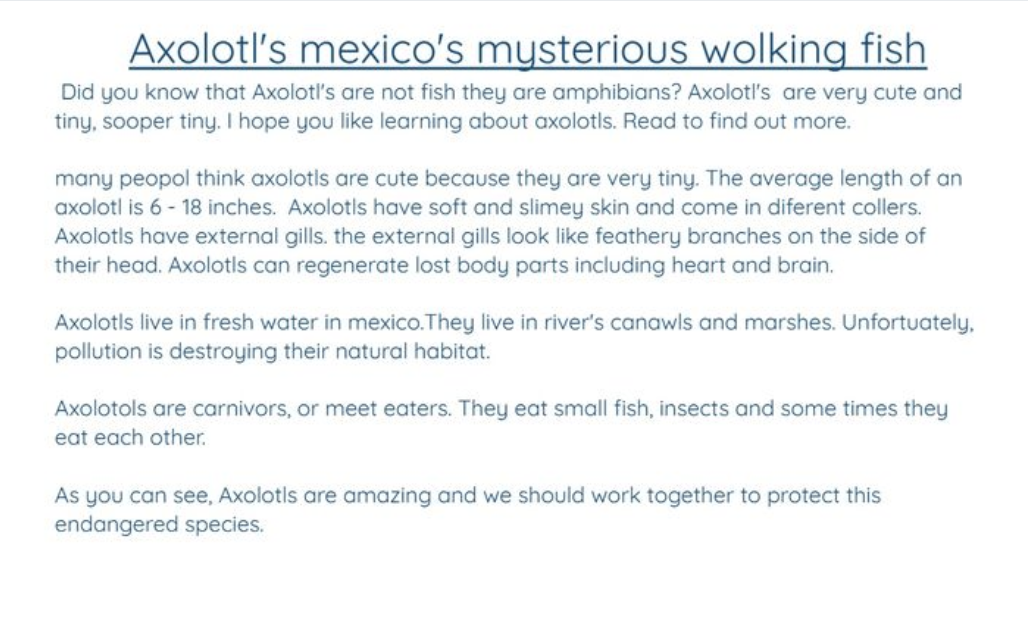
With their revised texts in hand, learners copied their work into Book Creator. They then transformed their writing into beautifully designed digital books, adding images and multimedia elements. Some learners went above and beyond, incorporating tables of contents and glossaries.

Seesaw: Sharing Our Published Works:

As published authors, learners proudly shared their digital books with their families via Seesaw. We downloaded them as PDFs, uploaded them to Seesaw and added the published book link to the first page. We also shared our books by reading them to a younger class, which was a very rewarding experience.

This app smash journey had a profound impact on my 2nd-grade learners. They experienced firsthand the power of AI as a valuable tool for both learning and creativity. The learners developed a deeper understanding of the writing process, moving beyond simple drafting to engage in meaningful revision and refinement. They gained confidence in their ability to use technology to enhance their learning, becoming more comfortable and proficient with digital tools. Furthermore, they learned valuable lessons about digital citizenship, understanding the importance of protecting their identity online while engaging with AI platforms.

This experience reinforced several key takeaways regarding the integration of AI in elementary education. Firstly, AI can be a valuable and accessible tool for even young learners, fostering creativity and critical thinking. Secondly, app smashing, when thoughtfully planned, creates engaging and meaningful learning experiences that resonate with learners. Finally, providing clear guidance, support, and a structured framework is essential for the successful integration of AI, ensuring that students can maximize its benefits while navigating potential challenges.

I sincerely encourage you to explore the vast possibilities of AI within your own classroom. Take the leap and experiment with app smashing, discovering firsthand how it can transform your teaching practices and enrich your students’ learning experiences. Share your own AI integration stories in the comments below, fostering a community of educators who are passionate about leveraging technology to empower the next generation of learners. Let’s continue to learn from each other and push the boundaries of educational innovation.

From Skeptic to Pioneer: My Journey into Incorporating AI in Education

At the start of the school year, if you had asked me about using AI in my teaching, my response would have been a firm no. I harboured skepticism about whether AI could truly enhance my role as an educator or bring added value to my learners’ learning experiences. However, a series of eye-opening experiences and a shift in perspective have led me to embrace AI tools in the classroom. Please note that both AI tools mentioned in this blog, do require setting up an account, which can be done for free.

In November, I attended a regional professional development session organized by our school. During this event, I had the chance to participate in various sessions led by fellow educators from our network. As the school’s social media manager, I discovered how colleagues were leveraging ChatGPT to streamline the process of generating engaging social media posts. Intrigued, I decided to give it a try, and the results were astonishing. Not only did it simplify the content creation process, but it also saved me valuable time that I would have otherwise spent agonizing over each word.

Another AI tool that caught my attention was Magic School AI, specifically designed to assist educators in optimising their workflow. With over 60 tools tailored for teachers, I started experimenting with the Report Card Comments tool. Inputting a student’s pronoun, strengths, and areas for growth resulted in a professionally generated comment in a matter of seconds. While convenient, I quickly adopted the best practice of maintaining an 80:20 ratio to ensure that my unique voice still resonated in AI-generated comments.

Curiosity piqued, I began to explore the possibilities of using Magic School AI to further streamline my responsibilities as an educator. Opting for the three levels of free training offered by the platform, I gradually became more comfortable integrating AI into my daily routine. The certification process, taking only 15-20 minutes for each level, empowered me with the knowledge to make informed decisions about incorporating AI into my teaching practices.After completing all three levels, I took the next step and applied to become a Pioneer and a Magic School AI Certified Educator.

While Magic School AI has proven invaluable in streamlining my lesson planning, I’d like to shine a spotlight on some additional tools that have become essential in saving me time on a daily basis.

1. Professional Email Tool: One of my go-to AI tools is the Professional Email tool, a game-changer for crafting concise and professionally worded emails. By inputting bullet points outlining my message, the tool swiftly generates a polished email. This has been a tremendous time-saver, allowing me to communicate effectively without sacrificing the quality of my correspondence.

2. Email Family Tool: Maintaining a professional yet friendly tone while connecting with families is crucial, and the Email Family tool excels at this. It’s important to note the significance of not sharing identifying or confidential information in any AI prompt. Recently, I needed to inform a parent about upcoming content in our Math class. Leveraging Raina, the chatbot associated with this Magic School AI, I effortlessly generated descriptions of the strategies we would be using in class. This proved especially beneficial as the strategies we employ in mathematics may differ from those parents learned during their school years. Below is an excerpt from the subsequent email I sent:

“Throughout the unit, we’ll showcase various strategies for both addition and subtraction. These strategies for addition include:

  1. Traditional Algorithm: We will reinforce the standard method of adding numbers, starting from the rightmost digits and carrying over when necessary.
  2. Place Value Strategy: Students will learn to break down numbers into their place value components (ones, tens, hundreds) and add them separately before combining the results.
  3. Base Ten Blocks: We will utilize base ten blocks, a visual representation of ones, tens, and hundreds, to help students understand the concept of addition and regrouping.
  4. Number Line: Students will practice adding numbers using a number line, which helps them visualize the progression from one number to another.
  5. Mental Math: We will encourage students to develop mental math strategies, such as adding multiples of ten or using friendly numbers to simplify calculations.

By exploring these strategies, students will gain a deeper understanding of addition and develop flexibility in choosing the most efficient method for different types of problems.”

3. Math Spiral Review Tool: Gone are the days of spending countless hours generating homework assignments. With the Math Spiral Review tool, I now efficiently create relevant homework tailored to the grade level, specific topics, desired number of questions, and any additional criteria. In a matter of seconds, a comprehensive question set is ready for use. This newfound efficiency allows me to redirect my time and energy towards more personalised engagement with my learners. It’s a win-win, ensuring that homework remains purposeful while I can focus on fostering a deeper understanding of mathematical concepts in other ways.

4. Information Texts Tool: The Information Texts tool has proven to be a lifesaver, especially when confronted with the challenge of guiding my students through planning informational texts on diverse topics of their choice. From Domestic Cats to Lionel Messi to Safed Dara, a region in Tajikistan where I am currently based, the variety was both exciting and daunting. Enter the Information Texts tool. During a lunch break, I input prompts for each topic, and within 15 minutes, personalised informational texts were printed and ready for our learners to utilise. What makes these generated texts even more valuable is that they function not just as a research source but also as excellent mentor texts, guiding students in crafting their own high-quality informational texts. Not only did this streamline the research process, but it also served as an impressive resource, with one student expressing how impressed he was that I found relevant information about his chosen topic.

This transformative journey has not only saved me time but has also opened my eyes to the potential benefits of AI in education. The integration of these AI tools into my daily routine has undeniably elevated my teaching experience, allowing for more targeted and personalised interactions with my students. As I embrace the possibilities AI offers in education, I am excited about the continued innovation and efficiency it brings to our learning environment. An additional bonus is that I have saved enough time to reignite my passion for blogging again.